Reset your password as a public user
You can change your password or reset it if you have forgotten your password.
Change your password
-
Log in to Public Portal.
-
Select the Profile menu.
-
Select Security.
-
Enter your Current password.
-
Enter your New password.
-
Confirm your new password by entering it again.
-
Select Save new password.
Reset your password
-
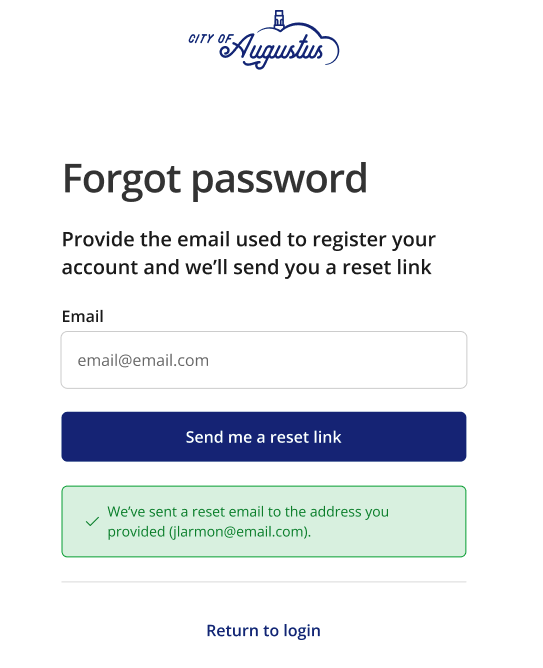
From the login page, the select Forgot your password to navigate to the Forgot password screen.
-
Enter the email address you used to register.
-
Select the Send me a reset link.
-
Open your email and locate the reset email.
-
Select the password reset link in the email.
-
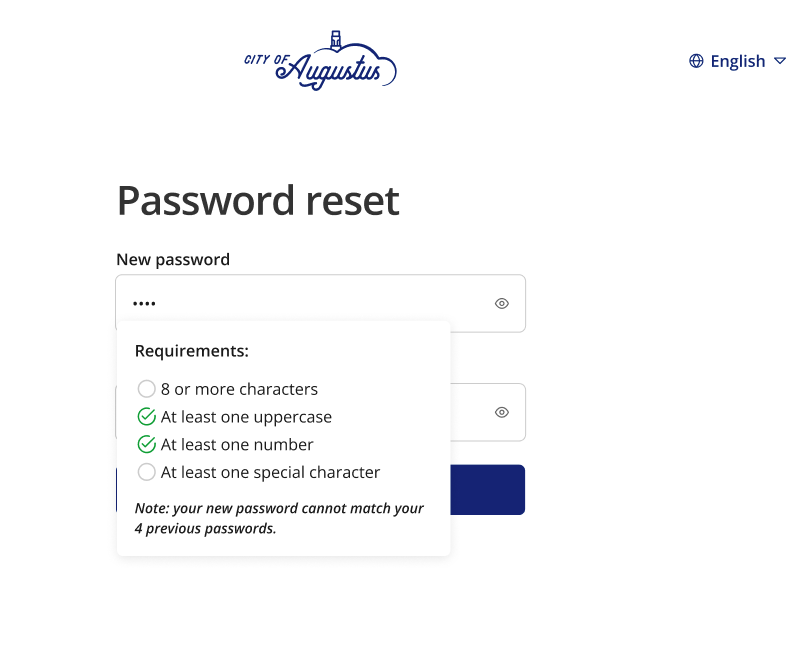
Enter your new password.
Note: You will be prompted to complete the password requirements for security purposes.
-
Confirm your new password by entering it again.
-
Select Save.
You will receive confirmation that your password has been successfully reset.
 See also